
In this article...
This article walks you through several important steps that both administrators and teachers should take to ensure your Reading Assistant (including usage with SPIRE Intervention and Reading Accelerator) data preservation at the end of each school year or instructional cycle.
Administrator End-of-Year Data Export
Reading Assistant does not retain student data from one school year to the next. To preserve assessment data, a district administrator must log in and download the Data Extract no later than July 31 of each year. All data will reset on August 1 to prepare for the new school year.
If the annual resent timeline conflicts with summer programming, please contact our support team to discuss adjusting the reset date as soon as possible but no later than 11:59 pm on June 30, 2026.
-
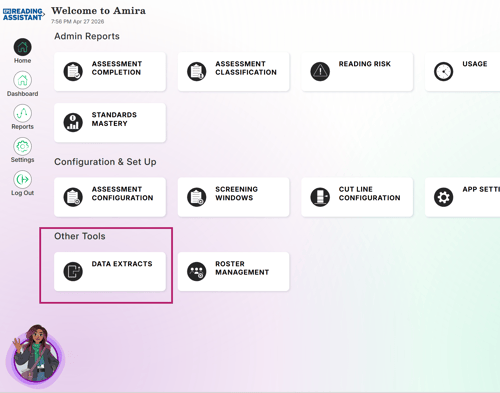
From the Admin Reports screen, select "Data Extracts"
-
Choose the District Level Assessments Report
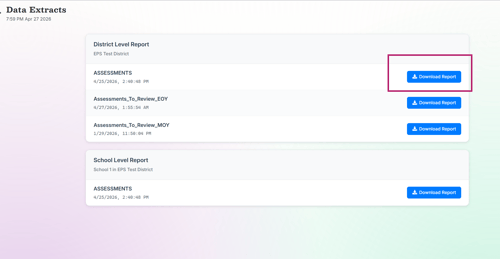
The data dictionary provides explanations for each field in the data extract export.
Additional End-of-Year Considerations
Before you wrap up your instructional cycle and export your student data, EPS highly recommends assigning your EOY Benchmark Assessments for progress reporting and reviewing and printing key progress and parent reports.
-
Assigning End of Year Assessments (Administrator and Teacher Directions)
- Print Parent Reports and Progress Reports