
To ensure SPIRE Up functions as expected, districts should review the system requirements below and share them with their IT team prior to student use.
This information helps prevent common access, performance, and audio issues.
Supported Devices & Browsers
Unless otherwise noted, Spire Up supports the latest two versions of all major browsers. If your browser displays a message that you need to update, follow the prompts on the screen to update your browser. If the message is still displayed after you update the browser, try clearing your browser cache and cookies.
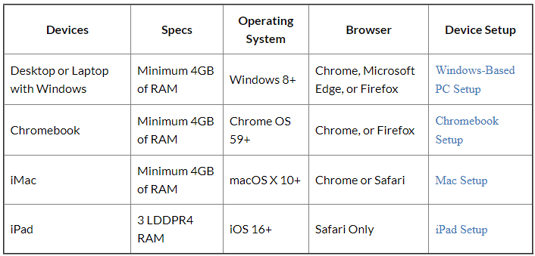
Device Notes
- iPads are supported for student use only
- iPads must use Safari
- Teachers and administrators must log in using a non‑iPad device
Headset Requirements
SPIRE Up relies on audio input for certain student activities. Using the correct headset is critical.
Recommended Headset Guidelines
- USB‑connected headset for non‑iOS devices
- 3.5mm headset for iPads (with an Apple‑brand Lightning or USB‑C adapter, if needed)
- Noise‑canceling microphone optimized for speech
- Over‑ear or on‑ear design
- Microphone boom long enough to extend in front of the student’s mouth
- No inline controls (avoid mute or volume buttons)
Headsets should be durable enough for repeated student use.
Network Requirements
SPIRE Up requires sufficient bandwidth for consistent performance.
Minimum recommendations:
- 10 Mbps download and upload per active device
- Classroom bandwidth should support all devices in use simultaneously
If users experience lag or loading delays, we recommend running a speed test on the affected device (for example, using a public speed test tool).
Firewall & Content Filter Requirements
Firewalls, content filters, proxy servers, and virus protection services can impact SPIRE Up functionality, even when bandwidth is adequate.
When possible:
- Bypass content filters and proxy servers for SPIRE Up traffic
- Ensure proxy server caching is configured correctly
Required Whitelisted Domains
Always allow (whitelist) the following domains in your school's firewall and allow for HTTP and HTTPS (SSL) connections:
https://www.google.com:443/speech-api/*
https://sentry.io:443
https://api.getmagicbox.com
https://googleapis.com
https://www.google-analytics.com
https://*.cloudfront.net:443
https://*.amazonaws.com:443
https://connect.epslearning.com
eastus.stt.speech.microsoft.com and also allow websocket endpoint wss://eastus.stt.speech.microsoft.com/stt/speech/universal/v2 from this host.
Failure to whitelist these domains may result in audio issues, access problems, or degraded performance.