This article serves as a quick reference guide to common questions and answers raised by teachers. We've compiled responses to the most frequently asked questions and key topics discussed. Use the linked topics below to quickly navigate to the information you need.
General Program Overview
Program Structure and Components
Instructional Design
Implementation and Scheduling
Assessment and Data Use
Managing Students, Classes, and Assessments
Support for Diverse Learners
Technical Difficulties
Additional Resources
General Program Overview
Q: What is SPIRE UP?
A: SPIRE UP is a blended print and digital intervention program designed for striving readers in grades K and above. It is grounded in Structured Literacy and the science of reading, offering explicit, systematic, cumulative, data-driven, and multisensory instruction.
Q: Who is SPIRE UP designed for?
A: Students who need targeted support in decoding and word recognition, especially those who have not yet crossed the “decoding threshold.”
Q: What are the instructional pillars of SPIRE UP?A: Phonemic awareness, phonics, fluency, vocabulary, and comprehension.
Program Structure and Components
Q: What are the main instructional components of SPIRE UP?
A: Each concept is taught across three lessons:
1. Sounds, Letters, and Words
2. Heart Words and Sentences
3. Connected Text: Let’s Read!
Q: What materials are included in the program?
Teacher’s Guide (print and digital)Letters and Sound Lesson Guide
Student Workbooks (2 volumes)
Letters and Sound Workbook
Letter Cards and Word Cards
Magnetic Letter Tiles and Boards
EPS Connect digital platform
Q: What is EPS Connect?
A: EPS Connect is a digital platform for teachers, students, and administrators that provides lesson resources, independent practice activities, and data dashboards.
Instructional Design
Q: How is each lesson structured?
A: Each lesson includes: Direct Instruction (15 min), Guided Practice (15 min), Independent Practice (15 min)
Q: How many total lessons are in SPIRE UP?
A: 192 lessons covering 64 target concepts.
Q: What is the instructional framework based on?
A: Gradual release of responsibility: “I do,” “We do,” “You do.”
Implementation and Scheduling
Q: What is the recommended group size and frequency?
A: Small groups, 30-minute sessions, three times per week. More intensive models are available for students with greater needs.
Q: How long does it take to complete the program?
A: With consistent implementation, students can complete the full sequence in two school years.
Q: Can SPIRE UP be used with students with IEPs?
A: Yes. It can be tailored to meet the frequency and duration specified in a student’s IEP.
Managing Students, Classes, and Assessments
Q: Why did my classes or students disappear after my role changed from School Administrator to Teacher?
A: Teacher accounts only see classes to which they are assigned. If access is still needed, a School or District Administrator can add the user as a co-teacher to the appropriate classes.
Q: Why can't I see who assigned my student an assessment?
A: SPIRE Up does not display who created an assessment assignment. If a student has already been assigned an assessment, other users cannot see who assigned it.
Q: Why can't I see all assessments assigned to students in my class?
A: Teachers can only see assessment assignments they created. Assessments assigned by another teacher or administrator will not appear on your dashboard.
Q: Why can't I see all assessments assigned at my school?
A: School Administrators can view assessment data across the school, but SPIRE Up does not show who created an assessment assignment. Teachers only see assessments they created themselves.
Q: What is the difference between an assessment group and a class?
A: Assessment groups are only used when assigning assessments. They do not create instructional groups or change class membership. Students receive instruction through their assigned SPIRE Up class, regardless of how assessments are assigned.
Q: Why do I see "groups" when creating an assessment?
A: The groups used during assessment assignment are only for selecting which students should receive the assessment. They are not instructional groups and do not affect student placement within classes.
Q: Why don't all students receive an Oral Reading Fluency (ORF) assessment after the placement assessment?
A: ORF assessments are assigned based on placement results. Students who place below the designated skill groups will not automatically receive an ORF assessment. This is expected behavior.
Q: Can I manually assign an ORF assessment?
A: No. ORF assessments cannot be manually assigned. Eligibility is determined by placement assessment results.
Q: Why are some of my students not available to select for assessment assignment?
A: If a student is in your class but unavailable for selection, they have likely already been assigned that assessment. To view assessment results, go to:
Assessments Tab > Students >Filter by Class > View Student Results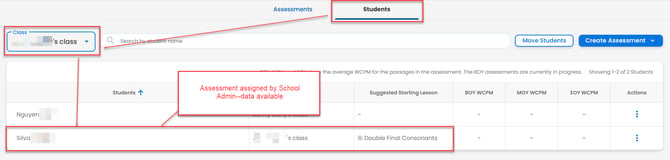
This will allow you to see assessment progress and results for students in your class, even if you were not the person who originally assigned the assessment.
Assessment and Data Use
Q: What assessments are included?
-Placement assessment
-Oral reading fluency assessments (WCPM)
-Ongoing formative assessments during lessons
-Digital performance tracking via EPS Connect
Q: Is there a printable version of the SPIRE Up placement assessment?
A: No. The placement assessment is adaptive and is only available digitally within SPIRE Up. It cannot be printed..
Q: Is the SPIRE Up Placement Test available in print format?
A: No. The SPIRE Up Placement Test is adaptive to student responses and cannot be printed.
Support for Diverse Learners
Q: How does SPIRE UP support multilingual learners?
A: Through contrastive analysis, cognates, visual supports, and collaborative opportunities in students’ home languages.
Q: What scaffolds are available for students with decoding or spelling difficulties?
A: Strategies include phoneme mapping, finger tapping, visual drills, articulation support, and morphology cues.
Q: What are my options if a student cannot complete an activity due to accessibility or instructional needs?
A: Depending on local guidance, an adult or teacher may assist the student with the activity. Another option may be to lock the lesson and move the student forward.
Please Note: Locking a lesson will also lock any remaining activities within that lesson. Before making changes, we recommend consulting with your school or district administrator, as local policies regarding accommodations, instructional supports, and student progression may vary.
Because accommodations, instructional supports, and student progression decisions can vary by school and district, we recommend consulting with your school or district administrator, special education team, or assistive technology specialist to determine the best approach for the student.
Technical Difficulties
Q: My microphone works in other applications. Why won't it work in SPIRE Up?
A: Even when a microphone works elsewhere, browser permissions, device settings, extensions, or network restrictions can prevent recordings in SPIRE Up. Your local technology team can help review these settings.
Q: What are the Technical Requirements for SPIRE Up?
A: Visit our Technical Requirements support article for more information.
Additional Resources
Q: What reproducible resources are included?
-Family letter
-Goal-setting sheets
-Update tickets
-Fluency and prosody rubric
-Graphic organizers
-Writing checklists
Q: How does SPIRE Up promote skills transfer?
A: Through consistent language across settings, recorded texts, and curriculum connections to science, math, and social studies.