
Overview
Activity Insights provides a comprehensive view of student performance within SPIRE Up, allowing educators and administrators to analyze data across multiple levels—from overall class performance down to individual student activity details.
This reporting tool helps users monitor progress, identify trends, and make informed instructional decisions based on real-time data and allows users to analyze data at the:
- Class level
- Skill level
- Lesson level
- Activity level
- Individual student level
It combines proficiency scores, activity completion, engagement data, and detailed performance metrics to help educators understand progress and guide instruction.
Within this article, you'll learn how to access:
The Activities Insight report can be accessed from the SPIRE UP dashboard.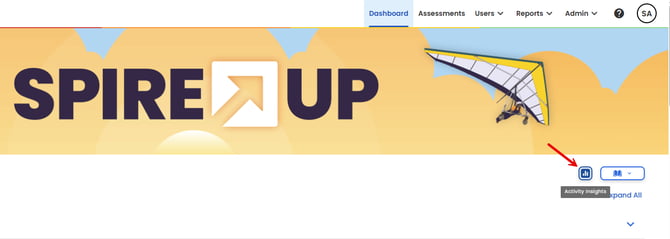
Class-Level Performance
Activity Insights displays an overall view of class performance, including:
-
Average proficiency score for the selected class.
This high-level view helps users quickly understand how a class is performing as a whole.
Skill-Level Insights
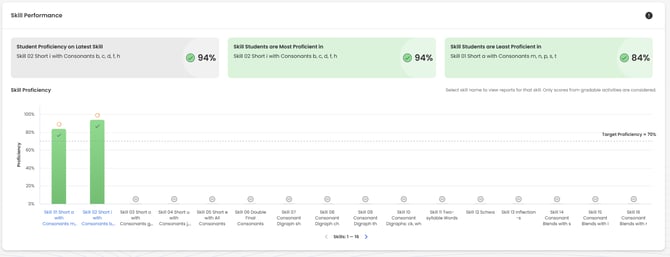
Users can review performance across SPIRE Up skills to identify:
- The current skill level students are working on
- The most proficient skills
- The least proficient skills
These insights help pinpoint strengths and areas where additional support may be needed.
Lesson-Level Data
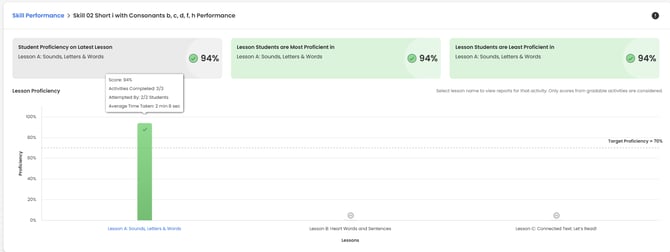
- Average lesson scores
- Number of activities completed
- Student participation (attempts)
- Time spent in lessons
This allows educators to analyze engagement and performance within specific lessons and can be accessed by clicking a completed skill in the Skill Level Insights report.
Activity-Level Performance
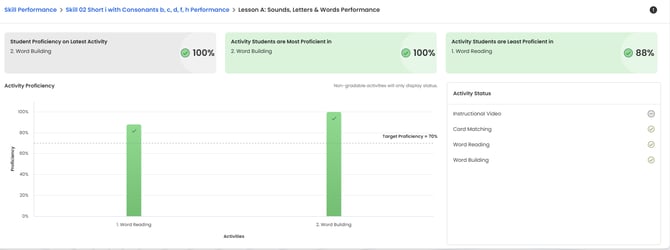
Within each lesson, users can view:
- Average proficiency for each activity
- Activity completion status (completed or not completed)
This level of detail helps track both progress and participation and can be accessed by clicking a Lesson in the Lesson Level Data report
Student-Level Detail
Activity Insights supports filtering by individual student, providing:
- Scores, including correct answers on first attempt [Admin Reports
- Number of attempts per activity
- Time spent on activities
This enables targeted analysis and supports intervention for specific students. To access Student-Level data, select Student in the View Reports By filter when selecting initial criteria. You will also be asked to select a completed skill.
Advanced Activity Data (e.g., Read Aloud)
For certain activities, Activity Insights includes additional performance data such as:
- Pronunciation Score
- Words Correct Per Minute (WCPM)
- Completion and accuracy metrics
- Time spent and submission details
In some cases, users can also review detailed student outputs, such as recorded responses. Advanced Activity Data can be accessed by clicking any of the hyperlinked headers at the Student-Level Detail report.
