
Overview
This article explains how to navigate and access reteaching content. In it, you will learn how to access Reteaching content as a teacher.
Reteach a Lesson
SPIRE Up allows teachers to reteach a lesson for students who did not reach proficiency for a specific skill/lesson. There are two methods available to accomplish this.
Method 1:
- From the Dashboard, open a Skill containing a previously taught Lesson.
- Select the Lesson within the Course Player to review Reteaching resources for the selected lesson.
Method 2:
- From the Dashboard, click the Analysis button and open a previously taught Skill from the drop down list
- Students will be identified under Need Help or Ready for Next Lesson
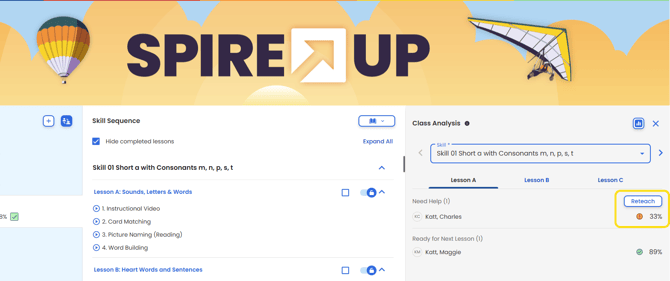
- Click "Reteach" within the Course Player to review reteaching resources for the selected lesson.