
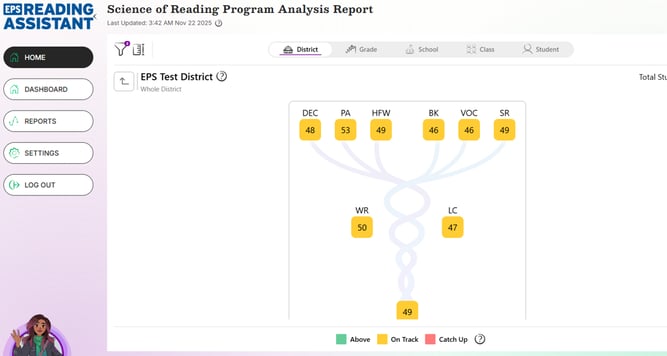
The Science of Reading Program Analysis Report offers administrators a powerful visualization of student reading proficiency, aligned with Scarborough’s Reading Rope literacy framework.
Key Features:
-
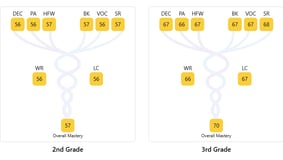
Interactive Graph
At the center of the report, you'll find a graph displaying average percentile rankings across six key dimensions of reading ability:-
Decoding
-
Phonological Awareness
-
High-Frequency Words
-
Background Knowledge
-
Vocabulary
-
Structures and Reasoning
These metrics contribute to scores for Word Recognition and Comprehension, which are then combined to produce an overall Mastery Score.
-
-
Drill-Down Capabilities
Double-click on any part of the graph to explore deeper insights within the report. -
Color-Coded Key

A classification key is available at the bottom of each page to help interpret performance tiers. -
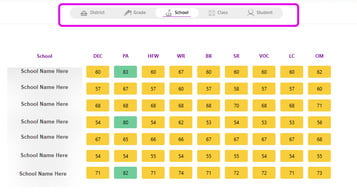
Multiple Levels of Analysis
Data can be viewed at various levels:-
District
-
Grade
-
School
-
Class
-
Student
-
-
Customization Options
-
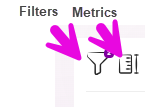
Use the Filters menu (left-hand side) to adjust the data displayed.
-
Use the Metrics menu to select which metrics you want shown.
-
-
Exporting Data

To download the data, click the Download button (downward arrow icon) in the upper right-hand corner of the report. -
Report update schedule: over the weekend
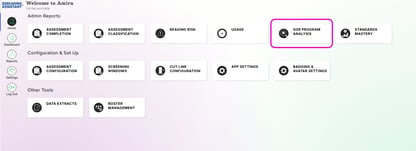
Accessing the SOR Program Analysis Report
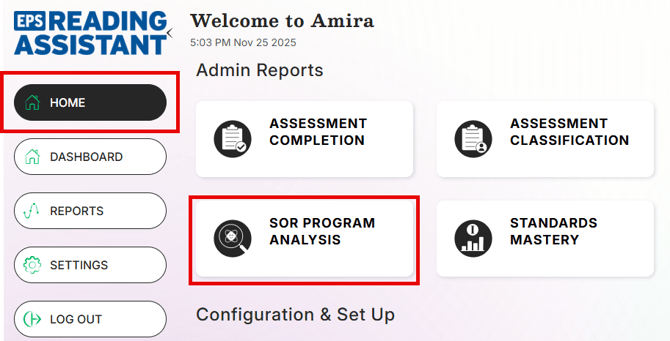
Step 1: Select Home
Step 2: Under Admin Reports, select SOR Program Analysis
Step 3: Apply filters as needed