
Use the ISIP Assess tile to review current assessment status or schedule a new assessment. You’ll find the ISIP Assess widget on the Teacher Growth Dashboard.
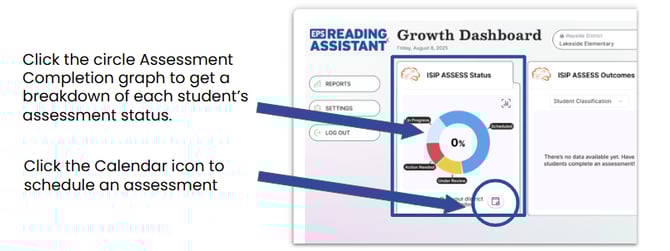
Assessment Status Definitions
|
Unassessed |
No assessment assigned. |
|
District/School Scheduled |
A screening window is active and an assessment will automatically be assigned to the student if they log in during the active window. |
|
Scheduled |
Assessment was assigned to the student's account. |
|
Scoring |
Student has completed the assessment and scores are processing. Scoring can take up to 24 hours. |
|
Under Review |
Assessment has been flagged for review. Amira staff will review and update the status after three business days, not including the date of assessment |
|
Completed MM/DD |
Assessment completed on this date and student successfully read an ORF passage |
|
Early Reader |
Assessment completed and student marked as a pre-reader due to not being able to read an ORF passage |
|
Reassess |
A valid score could not be generated from the student's data.
|