A District Admin account allows you to move licenses between schools.
 Instructions
To move licenses between schools, when logged in as a District Admin, do the following:
-
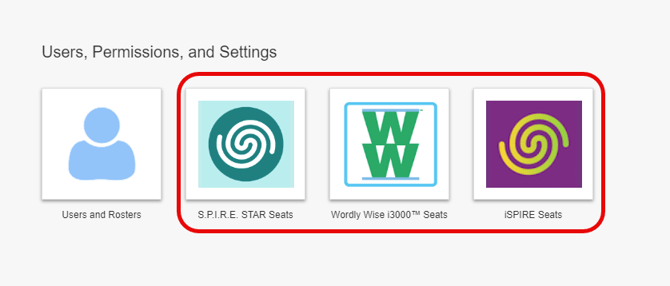
From your Admin dashboard, select the Seats button (S.P.I.R.E. STAR Seats, Wordly Wise i3000™ Seats, iSPIRE Seats).
-
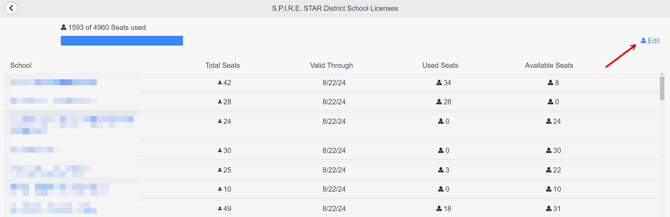
Click the Edit button in the upper-right of your District School Licenses page.
-
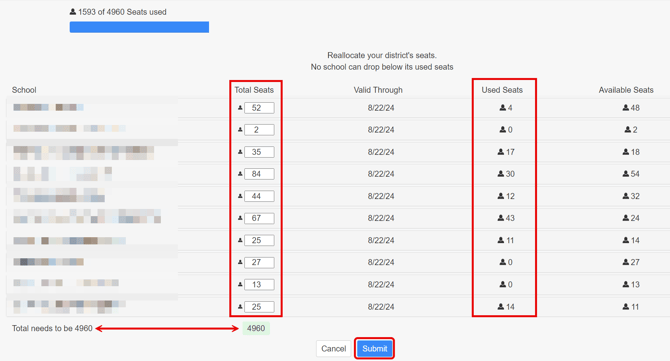
Adjust the Total Seat count to suit your needs.
-
The Total Seats allotted to any school cannot be less than the current Used Seats for that school. If your Used Seats exceeds the number you wish to assign to a school, you will need to remove licensed seats within that school. See related article below for steps on how to do this.
-
The total seat allocation must equal the number of available seats allowed by your district license.
-
If you have more licenses than are currently needed, you can ‘park’ them at one of the schools and move them when needed.
-
-
Once you have your seats allocated, click Submit.