
Already have an account? Login to start shopping and managing your account right away. Not sure what account type you have? Check here.
In this article...
Account Types
EPS offers two user account types for your purchasing convenience. Each account requires a unique email address.
| Individual Accounts | Organizational Accounts |
| Making personal purchases? Create a private account for fast and easy credit card purchases to residential addresses. | Purchasing with school/business funds? Search for your organization to take advantage of special pricing. |
|
|
|
 Parents, homeschoolers, or others making personal purchases.
 Standard Consumer pricing
 Pay by credit card
 Applicable state sales sax charged
 Immediate purchase access
 Users purchasing with school, district, or company funds.
 District-specific, distributor, or contract pricing
 Pay by credit card or purchase order
 Register with Your Organization
Organizational access requires a business account with EPS (registration can be a trigger for account setup) and a valid school/district or business email for approval.
Organizational accounts are for users purchasing for a U.S. school or district, distributor, or other business account with business funds and shipping to a business location.
- Enter your first name, last name, school/business email address, phone number, and job title.
- To locate an existing organization, enter the zip code of the school or business for which you will be purchasing then press TAB to load the list of organizations with an address in that zip code into the Organization Name dropdown list.
If you anticipate paying with district purchase orders, we recommend selecting the district account to retain visibility to your orders.
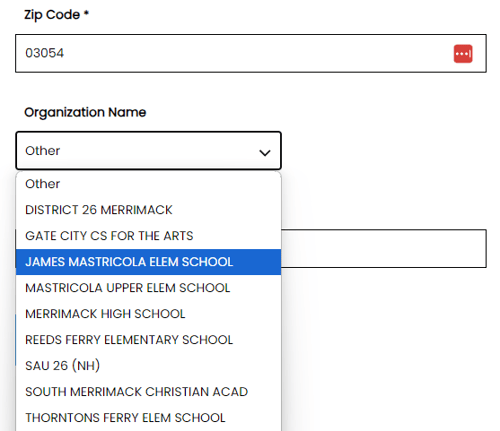
- Select your user role type:
- Admin User: Each account can have one admin user with visibility to the complete online and offline transaction history for the account. Admin users are typically in Finance, Purchasing, or Administration/Office Management for an organization.
-
General User: All non-Admin users for an account have visibility to their own online purchase history, and copies of most transaction documents.
-
Click submit and then review the submission confirmation pop-up and choose Continue to complete your registration or Go Back to return to the form and change information.
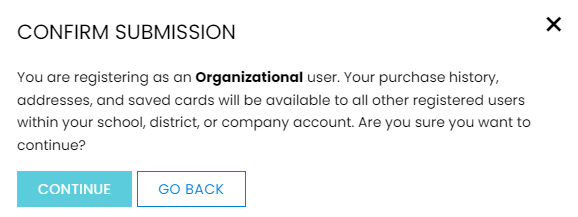
You know your registration has been sent to our Account Management team when you see the following confirmation message and receive an email with the subject “Thank you for registering with EPS Learning”. Once your account is approved you’ll receive an email with the subject “Your EPS Learning online account is ready”, which includes a link to set your initial password.
Having trouble signing up? Read through our helpful tips in Troubleshooting Common Registration Issues or contact our support team via live chat.
Register as an Individual
Individual accounts are for parents, homeschoolers, or other individuals not affiliated with a school or district or purchasing privately.
- Enter your first name, last name, email address, and phone number.
- Set your initial password. Passwords must be at least 8 characters and include at least one uppercase letter, lowercase letter, number, and symbol.
- Click submit and then review the submission confirmation pop-up and choose Continue to complete your registration or Go Back to return to the form and change information.
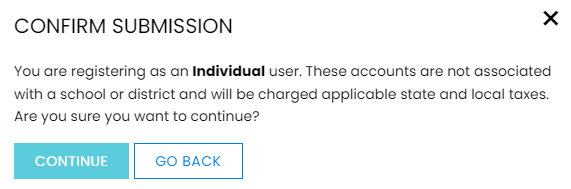
Having trouble signing up? Read through our helpful tips in Troubleshooting Common Registration Issues or contact our support team via live chat.