
This article walks you through several important steps that administrators or teachers should take to ensure your manually-rostered students are moved to the correct grade at the end of your instructional cycle.
The steps below only apply to manually rostered districts and schools. Clever and Classlink student promotion is handled through the rostering platform.
- Log in to the platform at https://connect.epslearning.com
-
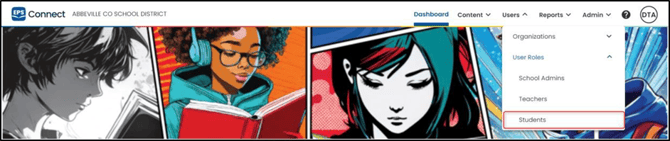
On the Navigation Bar, select Users > User Roles > Students to go to the Student Listing page.
-
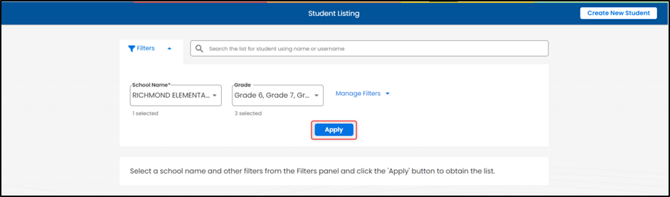
Select School Name and Grade and select Apply to generate the list of students.
-
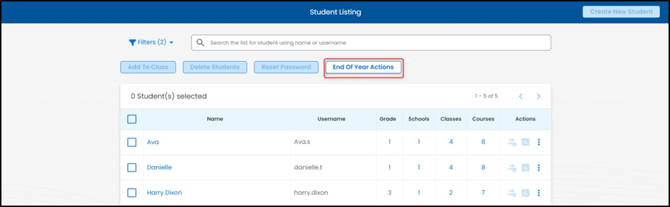
Select End of Year Actions.
-
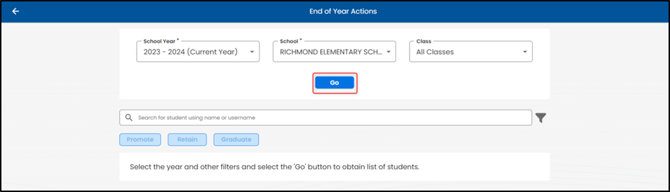
Step 4: Select School and Class and select Go to generate the list of students.
-
Select Promote, Retain, or Graduate for one or more students.
- Promote moves the student(s) to the next grade
- Retain keeps the student(s) at the same grade
- Graduate removes the student from the school
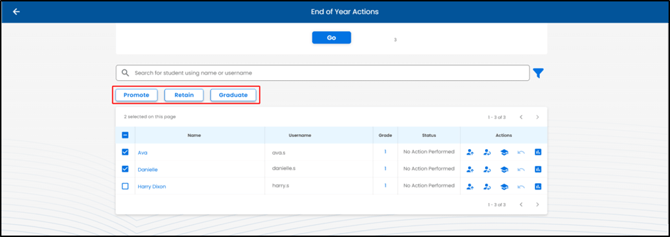
When All Classes is selected in the Class dropdown, students not associated with any classes will also be listed on the page on which the user can perform End of Year Actions.
End of Year Actions cannot be performed on students added to the system during the buffer period, which typically runs from July 1 to July 31.