
Check the status of your order if you’re not sure where your materials are on their journey to you.
In this article...
Customers typically receive orders placed through the EPS Customer Support team (sent to orders@epslearning.com) within 7-10 business days following our receipt of your valid, signed purchase order. Orders placed at shop.epslearning.com are typically received within 5-7 business days following checkout.
EPS Order Status Page
Use this method if you did not place your order online.
- Go to http://shop.epslearning.com/orders.
- Enter your EPS Sales Order Number. Your Sales Order number is a seven-digit number with the prefix “SO” that is typically found in the body of your confirmation email and in the top right corner of your confirmation PDF. The number can be entered as SO1234567 or simply 1234567
- Enter the Zip Code of the billing or shipping address as it appears on the order you are checking, then select Continue.
- Once the new page loads, you will find anonymized information on the status of the order.
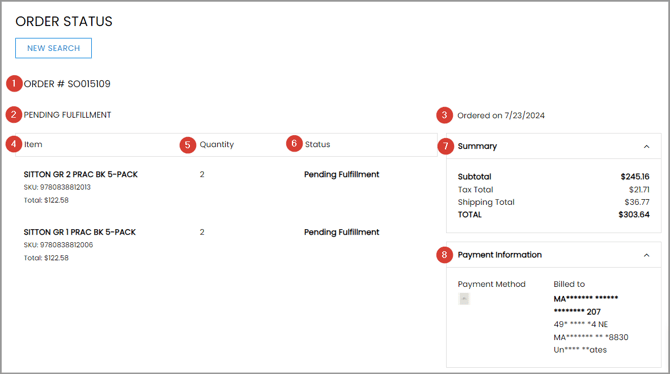
1 Order Number: The order you requested
2 Overall Order Status: Status for the order as a whole. See Order Status Definitions for detail.
3 Date Ordered: Date your order was first entered.
4 Line Item Description, SKU, and Total Price: Summary of each line on the order.
5 Line Quantity Ordered: How many of each item were ordered.
6 Line Status: Status for the individual line. See Order Status Definitions for detail. If your order has been shipped, your tracking information will be available here.
7 Order Summary: Overview of the item subtotal, applicable sales tax, shipping and handling, and the grand total.
8 Payment Information: Anonymized/masked information about the payment method used for the order.
Still can’t find the information you need? Contact our Customer Support team.
MyAccount at shop.epslearning.com
Use this method if you placed your order online at shop.epslearning.com
- Log in to the EPS online store at shop.epslearning.com/login.
- On the Overview page of EPS MyAccount you can find a list of the most recent purchases for your account.
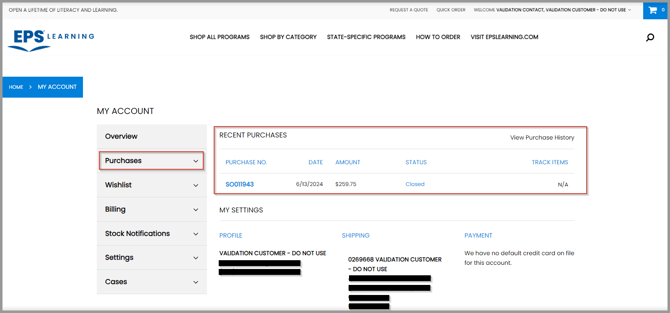
- You can also access a list of orders that is filterable by date range or open status by navigating in the left menu to Purchases > Purchase History.
- If you have an Organizational Account with your school or district, the Admin User has access to all purchases, online and offline, made by any user associated with that school or district.
- If you have an Individual Account, your online and offline purchases are only available to your specific account.
- In either case above, selecting the bold blue “Purchase No.” (your Sales Order Number) on the screen will open a new page with your order status details.
Still can’t find the information you need? Contact our Customer Support team.
Order Status Definitions
| Status Label | Definition |
| Processing/Order Entry | Your order has been received and our Customer Support team has begun entering it into our system. It may be on hold for possible purchase order corrections, missing tax exemption, past due balance, or other reasons, or it may just be actively being entered. If you order has been in this status for more than two business days, please check your email (inbox and spam folder) for any correspondence from orders@epslearning.com seeking additional information. |
| Pending Fulfillment | When your order has been finalized, it is sent to our Illinois-based warehouse for picking, packing, and shipping and/or digital license activation. This process typically takes one to three business days, depending on the size and complexity of your order and the time of year. If your order is large (over $10,000) additional logistical information may be requested to ensure a smooth freight delivery experience. |
| Partially Fulfilled | Unless your purchase order indicated that no backorders were permitted, your order may be sent in two or more shipments if we are out of stock on any items you have purchased. For partial fulfillments, the full amount of the order shipping and handling is charged on the first fulfillment and no shipping is charged on later shipments. |
| Pending Billing | Congratulations! Your order has left the warehouse and is on its way to you. Your invoice will be generated or your credit card will be charged for the order within 24 hours. If you have not been billed/charged within five business days of seeing this status, please contact our Customer Support team as there may be an issue with your selected payment method. |
| Billed | Your order has now been successfully billed/charged. You can now find a copy of any invoice or charge receipt in MyAccount under Billing > Invoices |